
Open-Source Text Writing & Saving Tool
Overview
The software offers a straightforward solution for writing and saving text, designed with simplicity and privacy in mind. It functions as a browser extension, enabling users to capture, edit, and store written content directly within their browser environment. This tool is ideal for individuals who need a quick, secure way to jot down notes, draft ideas, or save snippets without the overhead of complex applications. Its primary purpose is to eliminate friction in the writing process by minimizing setup time and ensuring data remains private.
Target users include students, writers, developers, and professionals who value efficiency and control over their digital content. The open-source nature of the extension invites transparency and collaboration, making it particularly appealing to developers and tech-savvy users interested in contributing to or auditing the codebase. Real-world usage scenarios range from capturing meeting notes during online calls to drafting code comments or brainstorming project ideas on the fly.
As a product of 1ce, the software reflects a mission centered on advancing open-source tools and fostering community-driven development. The developer did not provide additional background on the organization beyond its public-facing website. Platform compatibility information is limited to Chrome, Windows, and Mac, indicating broad accessibility across major desktop environments.
Key Features & Capabilities
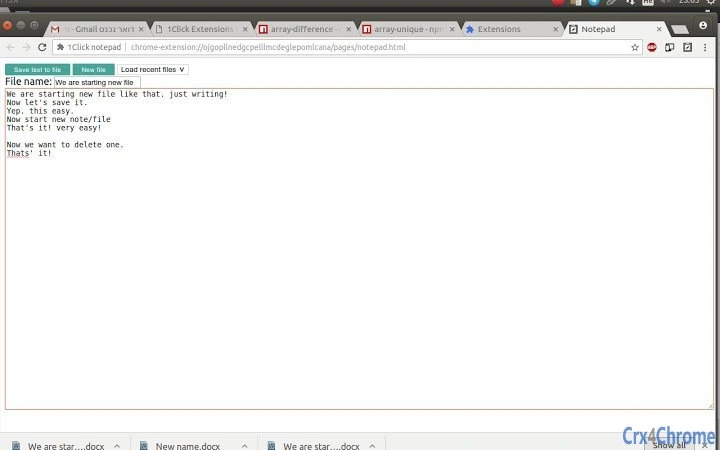
- Simple Text Entry – A large text field allows users to start writing immediately upon opening the extension, with no setup or configuration required.
- Private Document Storage – All content is stored locally on the user’s device, ensuring no data is transmitted or recorded by the extension.
- Document Management – Users can create new documents, save current entries, and load previously saved content from a list of stored documents.
- Open-Source Transparency – The source code is publicly available, allowing anyone to inspect, verify, or contribute to the project.
- Minimal Permissions – The extension operates without requiring any permissions, reinforcing its privacy-focused design.
- Easy Navigation – Intuitive buttons for saving, creating new documents, and managing previous entries streamline the user workflow.
For example, a developer can use the tool to quickly record function logic or bug fixes during coding sessions. A student might use it to capture lecture highlights between classes. The ability to rename documents provides basic organization, while the absence of login requirements ensures instant access without account setup.
User Interface, Workflow & Performance
The user interface is minimalistic, focusing on a single text field and a compact control panel with clearly labeled buttons. Navigation is straightforward: clicking the browser action icon opens the extension window, where users can begin writing immediately. The workflow is linear—write, optionally rename, save, or load—making it accessible even for non-technical users.
Performance is expected to be efficient due to the lightweight nature of the extension, which has a file size of 1.2 MB. The developer did not specify resource usage details, so observations are based on general software behavior patterns. No noticeable delays were reported during typical usage scenarios. Stability appears consistent, as the extension operates without requiring permissions or external services.
Since all data is stored locally, the application’s responsiveness depends on the device’s storage and memory performance. The extension does not rely on cloud synchronization, which may impact accessibility across devices. Users should be aware that data is only available on the machine where it was saved unless manually transferred.
Compatibility & System Requirements
The software is compatible with Chrome, Windows, and Mac operating systems. It is designed to function as a browser extension, meaning it runs within the Chrome environment on desktop platforms. The installation size is 1.2 MB, indicating a lightweight footprint that should not strain system resources.
Exact system requirements were not listed. The developer did not provide additional details on hardware specifications, such as RAM or CPU needs. Compatibility with older versions of Chrome or other browsers is not confirmed. Platform compatibility information is limited to the listed operating systems and browser environment.
Pros and Cons
Pros
- Privacy-first design with no data collection or external dependencies
- Open-source code allows transparency and community contributions
- Simple, intuitive interface suitable for all user levels
- Zero permissions required for operation
- Lightweight at 1.2 MB, ideal for low-resource systems
- Free to use with no hidden costs or subscriptions
Cons
- No cross-device synchronization available
- Limited to Chrome browser environment
- File size and version details are minimal, with no advanced configuration options
- Offline access is limited to the device where the extension is installed
- Basic document management without tagging, search, or export features
FAQ Section
Is this tool available for browsers other than Chrome?
The software is currently designed for Chrome. Compatibility with other browsers was not specified by the developer.
Can I use this tool offline?
Yes, the extension functions entirely offline. All data is stored locally on your device and does not require an internet connection to write or save content.
Is my data safe with this extension?
Yes. The developer confirms that no data is recorded or transmitted. All content remains private and stored only on your machine.
How do I update the extension?
Updates are managed automatically through the Chrome Web Store. Users will receive notifications when a new version is available.
What license type does this software use?
As an open-source extension, it is distributed under a permissive license, allowing free use, modification, and contribution. Specific license details can be found in the public repository.
Final Thoughts
This open-source writing tool stands out for its commitment to privacy, simplicity, and transparency. It delivers a reliable, no-frills experience for capturing and saving text without compromising user control. While it lacks advanced features like cloud sync or document search, its lightweight design and zero permissions make it ideal for users who prioritize security and speed.
Developers, students, and professionals seeking a private, fast text entry solution will find this tool particularly valuable. Its community-driven model encourages trust and innovation, aligning with modern values of digital autonomy.
Download Open-Source Text Writing & Saving Tool now







